Know what to do.
Focus on it.
Get it done.
ClutchTask helps you organize your work, see what matters next, and focus on one task at a time — without the complexity of traditional project management tools.
Less time managing your tasks. More time getting them done.
All tasks
Tasks
-
When it's time to work, ClutchTask puts the task you're working on front and center.Subtasks 2
- Review launch checklist
- Send team update
Comments 2- Alex: Final assets are ready to review.
- Sam: Added the latest launch notes.
Your task manager shouldn't become another task to manage.
ClutchTask gives you the tools to organize real projects and collaborate with others without turning task management into a project of its own.
- OrganizeKeep work grouped in clear lists and shared project spaces.
- PrioritizeKnow what matters instead of staring at an endless list.
- FocusWork on the task in front of you without unnecessary visual noise.
- CollaborateShare tasks, assign work and keep conversations with the work.

Keep completed projects safely out of the way while maintaining an immaculate workspace.
When a project wraps up, the last thing you need is a cluttered workspace and hunting for active tasks amid long-finished matters. ClutchTask lets you archive entire tables quickly and effortlessly. As a result, your workspace stays clean and strictly focused on current operations, while closed projects are never lost—you can dive back into them anytime the need arises.

Mark tasks as done and enjoy watching your progress.
Nothing builds motivation better than seeing tasks wrapped up and disappearing from your to-do list. In ClutchTask, marking a task as done is a one-click action that instantly updates its status and moves it to the completed section. You get a clear division between what’s still ahead of you and what you’ve already accomplished. As a result, at the end of the day you can clearly see the fruits of your labor, which brings immense satisfaction and naturally drives you forward.

Organize your work in flexible structures tailored to your projects.
Trimming everything down to one endless list is a recipe for chaos. ClutchTask allows you to build clean, separate boards to effortlessly organize different projects, departments, or daily routines. Group tasks however you like, break big goals into manageable sections, and keep everything in its proper place. Enjoy total control over your workflow with fast, intuitive project switching.

Mark important tasks with clear priorities so your list doesn't treat everything as equally important.
Not every task carries the same weight, and treating everything as urgent only leads to burnout. ClutchTask lets you intuitively set priorities that instantly reflect visually on your list. With clear color or graphic cues, you know at a glance which issues are critical to your project and what can wait for a quieter moment. You gain complete clarity, make decisions easier, and eliminate those moments when you lose sight of your most important goals.
Break complex work into smaller steps you can actually complete.
Large projects can overwhelm you with their sheer scale, making it hard to even get started. ClutchTask lets you create subtasks within a single main goal, allowing you to map out every stage of work in detail. Instead of a massive monster-task, you see a concrete, organized list of steps to check off one by one. It's a simple way to maintain momentum, avoid feeling lost, and successfully deliver even the most demanding projects.


Clear away distractions and step into deep, focused work.
Traditional to-do lists often overwhelm—everything feels equally important, and you waste energy figuring out what to do first. ClutchTask solves this problem with a unique, distinct visual highlight. When you choose to tackle a specific task, it receives a special graphic frame that instantly draws your eye and sets a clear direction for action. This makes it easier to stay fully focused, work without distractions, and check off completed goals with satisfaction.

Instantly identify the nature of your work and know exactly what kind of task you're tackling.
Not every task demands the same approach—some are quick bug fixes, others are brand-new features, and some are just routine admin work. ClutchTask lets you effortlessly tag the type of work right on every item, so at a single glance you instantly know whether you're facing a bug, a feature, or a conceptual task. This level of clarity streamlines filtering, optimizes resource planning, and gives you absolute control over the direction of your project.
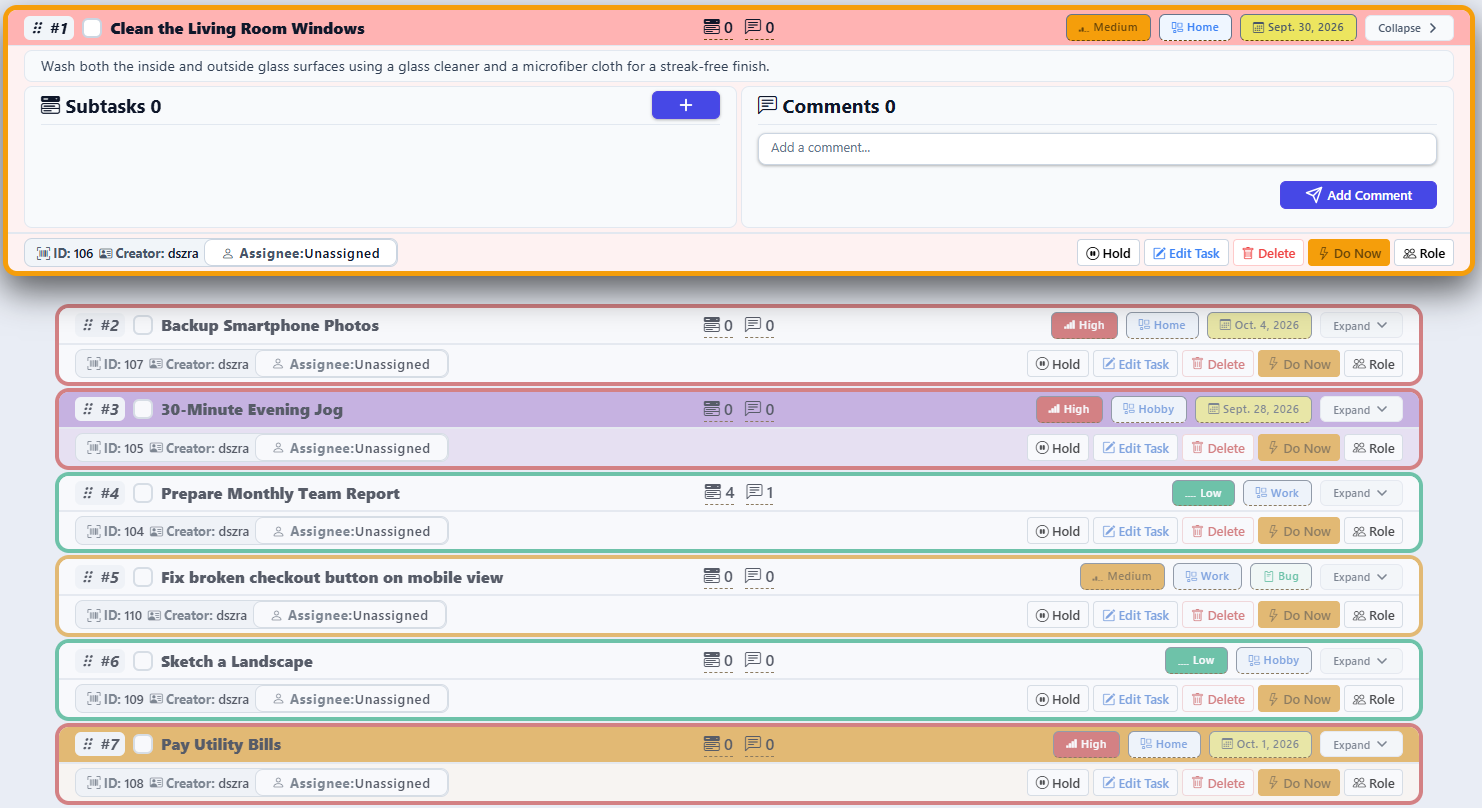
Set your own task order and structure your work exactly the way you need it.
Rigid, top-down lists can severely hinder your progress, especially when the situation in a project changes dynamically. ClutchTask gives you complete freedom in sorting and arranging tasks in whatever order makes the most sense at the moment. Whether you prefer to organize them by priority, urgency, or simply your own action plan, you have total control over it. As a result, your list always reflects your real game plan and leads you to your goal via the shortest path.


Deadlines make upcoming and overdue work immediately visible.
Amid the daily hustle, it is easy to lose track of passing time until it is too late. ClutchTask makes it simple to assign due dates to every task. The application automatically highlights items with fast-approaching deadlines as well as those that are already overdue. As a result, you always know what is racing against the clock, allowing you to prioritize your responsibilities accordingly and deliver everything on time without stress.
Pause stalled topics without letting them slip off your radar.
Sometimes work on a task has to be paused—you’re waiting for client feedback, a team decision, or additional materials. Instead of forcing it to stay on your active list or forgetting about it entirely, ClutchTask lets you put it on hold with a single click. The task steps out of the immediate firing line and stops distracting you, yet it safely waits for its moment to return to execution the second the roadblock is cleared.
Work together in real time and keep everything under control.
Group project management often ends in chat chaos and lost emails. ClutchTask enables seamless collaboration through easy sharing of entire tables and individual tasks with other users. Everyone works on the same up-to-date view, ensuring everyone knows exactly what is happening in the project. You gain a shared space that brings the team together and eliminates misunderstandings.
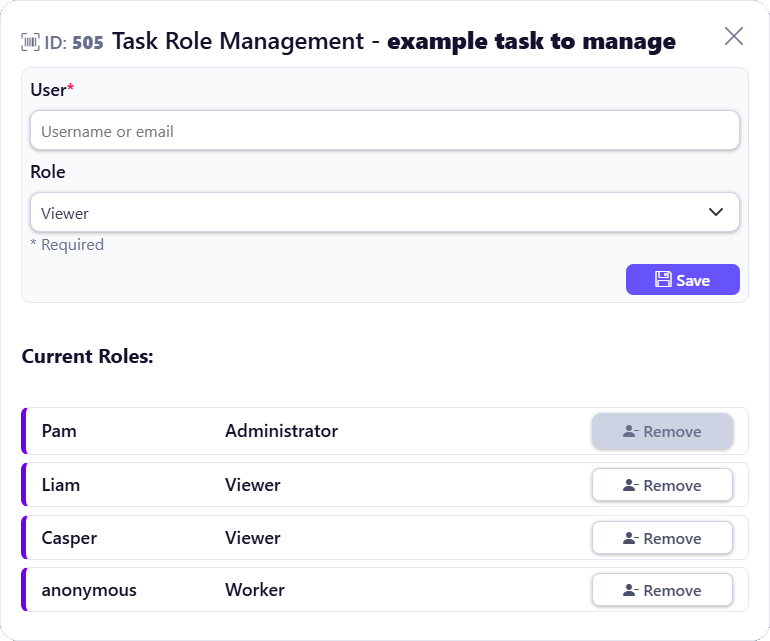
Clearly define accountability so everyone knows who is responsible for what.
When multiple people work on a project, the most common issue is the classic 'somebody's job is nobody's job' scenario. ClutchTask allows you to quickly assign specific users to individual tasks. As a result, you know at a glance who is in charge of a given step and whose hands its completion depends on. A clear division of ownership eliminates guesswork, streamlines delegation, and ensures that no task ever falls through the cracks.
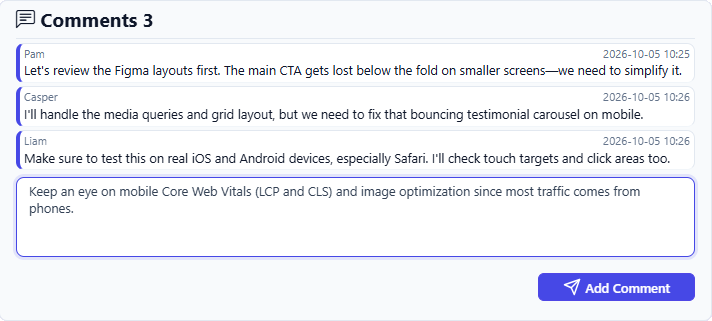
Exchange feedback and agreements directly within the task.
Hunting for agreements with clients or coworkers across email history or chats is exceptionally frustrating and time-consuming. ClutchTask lets you carry on discussion threads in the form of comments attached directly to a specific task. You always have all the key information, decisions, and historical context right at hand, precisely where they are needed. As a result, nobody wastes time searching for details, and team communication becomes fully transparent and organized.
Questions about organizing tasks and projects?
Here are a few quick answers to help you decide if ClutchTask is the right task management app for you.
Is ClutchTask free to use?
Yes. You can create a free account and organize your tasks, lists and projects online with ClutchTask.
Can I use ClutchTask for personal tasks and team projects?
Yes. Keep your personal to-dos in your own task list, or share task lists with your team to coordinate project work.
How do I organize tasks by project?
Create task lists for different areas of work and use projects to group related lists. This helps keep project tasks organized and easier to find.
Can I set task priorities and due dates?
Yes. Set a low, medium or high priority and add a due date to a task, so you can see what needs attention first and when it is due.
Can I break a large task into smaller steps?
Yes. Add subtasks to a task and mark each step complete as you make progress.
How can my team collaborate on tasks?
Share task lists, assign tasks to team members and add comments directly to a task to keep the conversation with the work.
Can I see which task I should work on next?
Move your current task to the top of the list and organize other work by priority and due date, making your next step easier to spot.
Can I use ClutchTask on my phone?
Yes. ClutchTask runs in a web browser, and its responsive layout adapts to smaller screens as well as desktop.
Ready to get your tasks in order?
Bring your tasks together and make space for the work that matters.